System Design Networking
WebRTC
Imagine you join a browser video call: the camera light turns on, faces appear in under a second, and your voice lands without a long freeze. To the users it feels like one button. Under the hood, two devices behind home routers must find each other, agree on codecs (the formats used to compress audio and video), and stream media directly peer-to-peer wherever possible, without routing every frame through your app servers.
is the browser API and protocol stack for that story. The hard part is rarely the camera. It is getting through (the router trick that lets many devices share one public address) and firewalls, sending media over so a lost packet never stalls the call, and then keeping that call alive when Wi-Fi flips to cellular.
Call join journey
Peers swap offer and answer metadata through your server; the video never passes through it.
Each side learns its own public IP and port as seen from outside its NAT.
Both peers try every candidate address pair until one path carries packets.
Media or
Media flows directly over UDP when possible; a relay carries it when NATs refuse.
Try it: ICE candidate selection and NAT fallbacks
Simulate candidate gathering with and without symmetric NAT. See when STUN reflexive paths succeed and when TURN relay becomes mandatory.
Host candidate
not gatheredDirect LAN path when both peers share a network.
Server reflexive (STUN)
not gatheredPublic address discovered via STUN; works when NAT allows UDP hole punching.
Relay (TURN)
not gatheredMedia flows through a relay when symmetric NAT or firewalls block direct UDP.
- Candidates gathered
- 0
- Selected path
- none
- Expected latency
- —
Gather ICE candidates, then pick the pair you expect to win connectivity checks.
What actually happens on Join
The four-step journey in the panel above hides one surprise: your product still needs a server, but not as a media middleman for every 1:1 call. A you control (usually WebSocket or HTTP) carries offers and answers (each side's description of the codecs and encryption it supports) plus candidates (the addresses worth trying). That traffic is tiny compared with the media it sets up.
Each peer then asks a server, "How do I look from the public internet?" and both sides send packets to each other's discovered addresses at roughly the same moment. The outbound packet teaches each to accept the reply, which is the trick called hole punching. When it works, audio and video flow peer-to-peer. When a corporate firewall or a symmetric NAT (a strict router type that defeats hole punching) refuses, relays the media through a server you run, so the call still connects at the cost of bandwidth and latency.
Real products also plan for pain. Wi-Fi to cellular handoffs, sleeping phones, and rotating NATs all break an established ICE session, so the app re-signals, runs ICE again, and often falls back to TURN for a moment. Saying that out loud shows you know the operational story, not just the happy-path diagram.
How to choose WebRTC
Knowing how a call connects is only useful if the product is actually a call. Three questions decide whether WebRTC belongs in your design at all.
1. Is this live audio or video, or closely related media? Conferencing, telehealth visits, low-latency interactive streams, and some cloud-gaming paths fit. Text chat, feeds, and generic APIs usually do not.
2. Is a dropped frame better than a freeze? Live media usually says yes, which is thinking: skip a stale packet rather than wait for TCP to retransmit a frame nobody needs any more.
3. Can you operate NAT traversal? Budget for signaling, , relay bandwidth, reconnect handling, and a media server for group rooms. WebRTC is niche and expensive to get right.
Simple rule of thumb
Reach for WebRTC when the product is a call: voice, video, or screen share with sub-second latency. Prefer WebSockets, SSE (server-sent events), or ordinary HTTP for chat text, notifications, and dashboards. Do not invent peer-to-peer because it sounds advanced.
Video call system design path
Signaling
Signaling carries the offer and answer that describe the proposed media session. It also carries ICE candidates, which describe possible network addresses for reaching a peer. The application supplies this signaling channel, often using HTTP or WebSockets; WebRTC does not define a room or messaging service for it.
Identity
Check who the participant is and whether they may join this room before sharing private session details. Browser permission to use a microphone only grants local device access. It does not establish that the participant may hear a particular meeting or publish video to it.
Room state
Room state records membership and permissions, including who may publish media. A reconnecting participant needs the current room state, not merely another network connection. Distinguish temporary loss of connectivity from an intentional departure, and expire abandoned sessions so the participant list does not accumulate ghosts.
Media path
For a two-person call, a direct connection may avoid relaying media through your servers. When direct connectivity fails, a TURN relay forwards packets. Group calls often use a selective forwarding unit (SFU), which receives participant streams and forwards selected ones. TURN solves reachability; an SFU organizes media distribution.
Optional services
Recording and transcription need their own processing and storage paths. Quality monitoring should distinguish network loss, jitter, and decoding trouble so an operator knows which part of the call degraded. Decide which optional service may fail independently without interrupting the live conversation.
Why can't two clients just connect?
The architecture path above assumes peers can reach each other, so it is worth slowing down on why they cannot by default. On the internet, clients sit behind and firewalls, and they do not have public IPs that other clients can dial directly.
The problem
Alice's laptop has the IP 192.168.1.42 and Bob's has 192.168.0.15. Both are private addresses that only work inside their own home networks, so Alice cannot send a packet to Bob's private IP: it is simply unreachable from her side. Even the public IPs of their routers do not help, because firewalls there block any inbound traffic nobody asked for.
Why not expose the laptop?
Clients are not servers: they have no open ports waiting for connections. NAT translates private addresses to the public one on the way out, but blocks unsolicited inbound packets on the way in, and firewalls exist specifically to prevent direct access to client machines. Exposing a laptop directly would be a security nightmare. The workaround is the one from the join story: ask for the public address, then punch a hole through the NAT with simultaneous packets, and fall back to a relay when that fails.
The NAT Traversal Dance:
1. Alice asks STUN: "What's my public IP?"     → STUN: "203.0.113.5:54321"
2. Bob asks STUN: "What's my public IP?"        → STUN: "198.51.100.8:12345"
3. Alice sends her public IP to Bob (via Signaling Server)
4. Bob sends his public IP to Alice (via Signaling Server)
5. Both try to send UDP packets to each other's public IPs simultaneously
6. NATs see outgoing packets and allow the reply → "hole punched"
7. Direct P2P connection established!

If hole-punching fails (corporate firewall, symmetric NAT):
→ Fall back to TURN server (relay all media through server)
The three servers that set up a call
Signaling exchanges an offer, answer, and connectivity candidates through your application’s chosen channel. ICE then tests candidate pairs to find a usable network path. STUN helps discover an externally visible address; TURN provides a relay candidate when direct communication is unavailable. Exchanging an address is therefore only one step: connectivity checks must establish that packets can actually traverse the two networks.
The dance above named three helpers. WebRTC needs three kinds of servers just to establish a connection, but once connected, media often flows directly between peers.
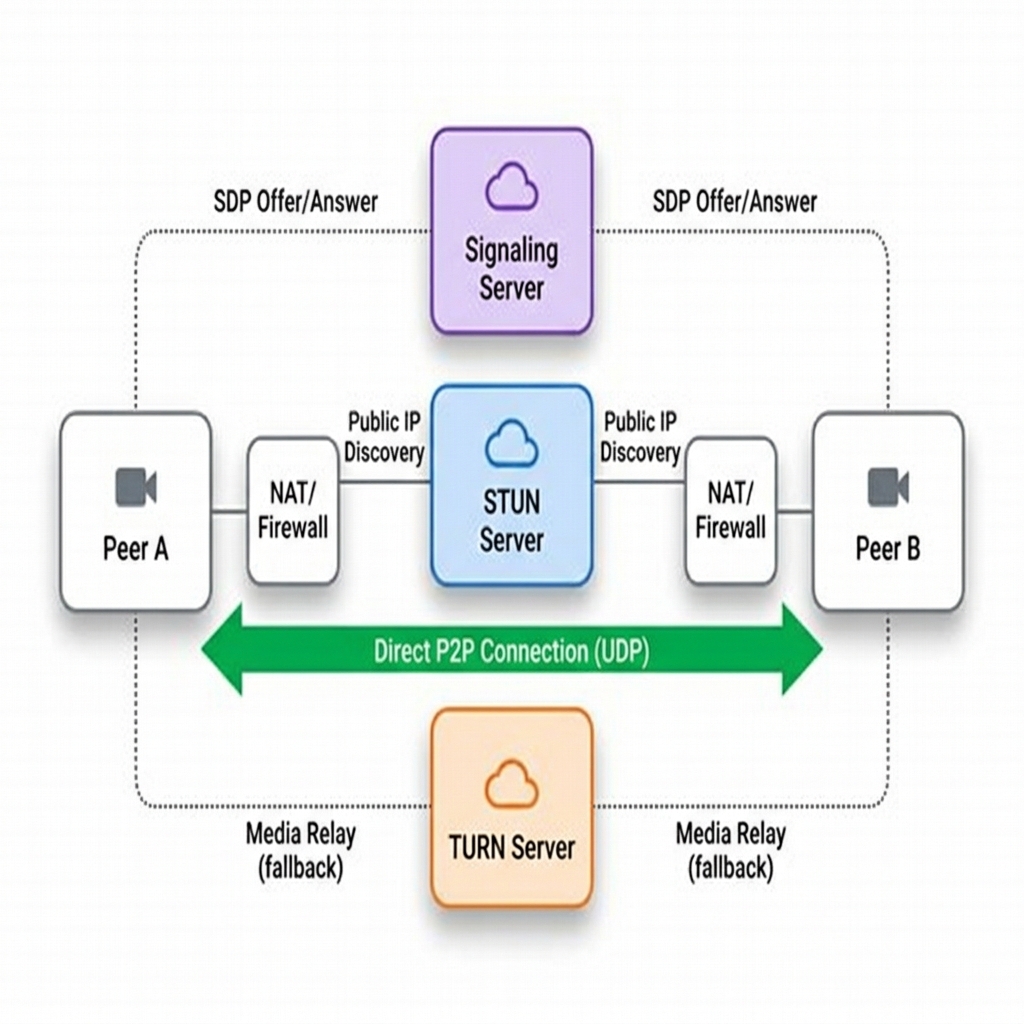
The matchmaker that introduces peers to each other. WebRTC does not define how signaling works, so you build this yourself with WebSockets, HTTP, or whatever fits.
- Exchanges offers and answers, which carry codec, resolution, and encryption details.
- Forwards candidates, the IP and port combinations each peer should try.
- Handles room management, meaning who is calling whom in which room.
- Stays lightweight because it moves only metadata, never the audio or video.
// Signaling server (WebSocket)
wss.on('connection', (ws) => {
  ws.on('message', (msg) => {
    const data = JSON.parse(msg);
    // forward to the other peer
    const target = rooms[data.room]
      .find(p => p !== ws);
    target?.send(msg);
  });
});(Session Traversal Utilities for NAT)
A STUN server reports the source IP address and port it observes, allowing a peer to form a server-reflexive connectivity candidate. STUN traffic is small compared with relayed video, but hosting still consumes infrastructure and bandwidth. Whether a direct path succeeds depends on both NAT and firewall behavior; ICE connectivity checks determine which candidate pair is usable.
(Traversal Using Relays around NAT)
When direct peer-to-peer fails behind symmetric NATs or strict firewalls, TURN acts as a media relay: all video and audio flows through the TURN server. This is expensive because you are paying for that bandwidth, and it adds latency because media takes a detour through your server.
Numbers to know
- 20–50ms: acceptable video latency, the budget every design choice on this page protects.
- 200ms+: a single TCP retransmission, which alone blows the latency budget.
- 1–5%: typical packet loss on real networks, so loss handling is not optional.
- ~80%: STUN alone succeeds on most home NATs, using one UDP request and response.
- Free public STUN servers exist, such as
stun.l.google.com:19302, so discovery costs you nothing. - ~20%: calls that need TURN relay, mostly corporate networks and strict NATs.
- ~1.5 Mbps: bandwidth you pay for per relayed video call, plus added latency.
Why UDP instead of TCP?
Live media has a playout deadline. A short jitter buffer absorbs uneven arrival times, while congestion control adjusts bitrate and loss recovery may retransmit selected useful packets or use redundancy. A packet arriving after its scheduled playout can be worthless even if delivered perfectly. UDP is useful because the media stack can choose which losses to repair instead of requiring every later byte to wait behind one missing byte.
UDP is the preferred media path, but restrictive networks may require TURN connectivity over TCP or TLS. This fallback improves reachability while reintroducing some delay and head-of-line risks. WebRTC data channels also have configurable reliability and ordering, so do not apply the media rule “drop old frames” to every application message sent through WebRTC.
Most live media prefers UDP because a timely newer frame can be more useful than a complete but delayed older frame. The media stack still implements congestion control and selective recovery. Some restricted networks require TCP or TLS relay fallback, so a working WebRTC service needs to test both direct and relayed paths rather than assuming UDP always succeeds.
TCP for video calls
- A lost packet triggers a retransmit, which typically costs around 200ms of delay.
- Head-of-line blocking means every later frame waits behind the missing one.
- The retransmitted frame is already outdated on arrival: video freezes, audio glitches, lip sync breaks.
- TCP congestion control, its automatic slow-down on loss, throttles the whole stream.
UDP for video calls
- A lost packet is simply skipped and the next frame is shown instead.
- No head-of-line blocking, so one missing frame never stalls the ones behind it.
- You see a tiny glitch, but the stream stays real-time rather than lagging.
- The app controls quality itself, trading lower resolution for less delay.
- WebRTC adds its own congestion control (GCC) tuned for media instead of TCP's.
The latency and packet-loss figures that make this trade-off concrete are in Numbers to know above.
Connection setup flow
Here is what the signaling and steps look like in browser code, using the RTCPeerConnection API. The iceServers list in step 1 is where the and servers from the previous section are plugged in, and the offer and answer travel through your signaling server.
Step 1: Create offer (caller)
const pc = new RTCPeerConnection({
  iceServers: [
    { urls: 'stun:stun.l.google.com:19302' },
    { urls: 'turn:turn.example.com', username: 'user', credential: 'pass' }
  ]
});

// Add local media
const stream = await navigator.mediaDevices.getUserMedia({ video: true, audio: true });
stream.getTracks().forEach(track => pc.addTrack(track, stream));

// Create and set offer
const offer = await pc.createOffer();
await pc.setLocalDescription(offer);

// Send offer to peer via signaling server
signalingServer.send({ type: 'offer', sdp: offer });
Step 2: Create answer (callee)
signalingServer.on('offer', async (offer) => {
  await pc.setRemoteDescription(offer);

  const stream = await navigator.mediaDevices.getUserMedia({ video: true, audio: true });
  stream.getTracks().forEach(track => pc.addTrack(track, stream));

  const answer = await pc.createAnswer();
  await pc.setLocalDescription(answer);

  signalingServer.send({ type: 'answer', sdp: answer });
});
Step 3: ICE candidate exchange
// Both peers exchange ICE candidates
pc.onicecandidate = (event) => {
  if (event.candidate) {
    signalingServer.send({ type: 'ice', candidate: event.candidate });
  }
};

signalingServer.on('ice', async (candidate) => {
  await pc.addIceCandidate(candidate);
});

// When connected, receive remote video
pc.ontrack = (event) => {
  document.getElementById('remoteVideo').srcObject = event.streams[0];
};
Where WebRTC fits, and where it does not
With the mechanism clear, the question becomes product fit. These are the shapes teams actually ship with WebRTC, followed by the yes and no lists you can apply to a new design.
Where teams use it
- Video calling: direct peer-to-peer for 1:1, media servers for meet-style group rooms.
- Cloud gaming: server renders the game, streams video down, input returns over a .
- Low-latency live: interactive streams needing sub-second delay, unlike 10–30s HLS/DASH segment streaming.
- File sharing: WebTorrent or ShareDrop-style transfers over data channels, with no server storing the file.
- Telehealth: browser visits with built-in encryption, so many patients never install an app.
- IoT remote control: low-latency camera video plus a data channel carrying commands back.
Use WebRTC when
- Real-time audio or video between clients, which is the core use case.
- Peer-to-peer data transfer, such as file sharing without any server storage.
- Sub-second latency is required, as in cloud gaming where lag ruins play.
- End-to-end encryption for media is mandatory, which WebRTC provides by default.
- You want to reduce server media bandwidth on 1:1 calls by going direct.
Don't use WebRTC when
- Server-to-client streaming, where HLS/DASH or SSE (server-sent events) fit better.
- Text chat only, because plain WebSockets are simpler to build and operate.
- Recording or archiving is the primary goal, since that needs server-side media anyway.
- Large group calls (50+) without a media server ( or , covered below).
- Perfectly reliable delivery is critical, where TCP-based protocols are the right tool.
Group calls: P2P vs SFU vs MCU
For six participants sending a 1 Mbps stream to every other participant, a full mesh requires each person to upload roughly 5 Mbps and the room carries 30 directed streams. With an SFU, each participant sends one stream or a small set of simulcast layers to the server, which forwards selected versions to receivers. This reduces client upload duplication but moves bandwidth and routing work to the service. An MCU mixes media, trading server processing cost for simpler receiver streams.
Several of the products above are group rooms, and that changes the media topology. One-to-one calls can be direct P2P; group calls usually need media servers because every browser cannot upload a separate stream to every participant.
P2P mesh
Each peer sends media to every other peer. Simple for 1:1 or tiny rooms, but upload bandwidth grows with participant count.
Best for: 1:1 calls, small private rooms.
A Selective Forwarding Unit receives one stream from each participant and forwards selected streams without decoding or mixing them.
Best for: scalable conferencing.
A Multipoint Control Unit decodes, mixes, and re-encodes into one stream per client. Easier for weak clients, expensive for servers.
Best for: legacy endpoints, recording, strict layouts.
Debugging questions worth asking
A successful call setup and a good call are different outcomes. If setup fails, inspect signaling, candidate selection, and relay reachability. If the call connects but sounds broken, inspect packet loss, jitter-buffer delay, bitrate adaptation, CPU saturation, and the selected path. Segment metrics by network type and relay usage; a global average can hide an entire class of corporate networks that cannot connect.
Whatever the topology, when a call is bad, narrow it down in order. Is the call failing during signaling, candidate exchange, DTLS setup (the encryption handshake that protects the media), or media flow? What percentage of calls falls back to ? Are packet loss, jitter (uneven packet arrival timing), or bitrate adaptation driving poor quality? Are users behind symmetric NATs or corporate firewalls?
Media networking math
One-to-one call
Two peers at 1.5Mbps video each need roughly 1.5Mbps up and 1.5Mbps down per participant, plus audio and control traffic.
10-person mesh
Each user uploads 9 streams. At 1Mbps per stream, that is ~9Mbps upload per user, too high for many mobile networks.
Forwarding server
Each user uploads one stream; the media server forwards selected streams. Server egress becomes the main cost and scaling dimension.
Wrap-up
What to remember
You have seen the join dance, the three servers, the UDP trade-off, and the group topologies. WebRTC is rarely the center of a general system design interview, so compress it. If the problem is "design a video call app," say: P2P for 1:1, for groups, / for traversal, for low-latency media, and signaling via WebSocket. Then move on unless the problem is clearly a conferencing product.
Bandwidth shifts toward clients on 1:1, but at scale you still need media servers for rooms. Keep WebRTC for conferencing-style media, and prefer simpler HTTP-shaped realtime or WebSockets for chat text, notifications, and dashboards. Call out that NAT traversal, TURN, and reconnects are operationally hard. That honesty is part of the answer.
Primary sources
- RFC 8825: WebRTC Overview : the architecture overview of how the protocol pieces fit together.
- RFC 8445: ICE : the NAT traversal procedure behind candidate gathering and hole punching.
- W3C WebRTC 1.0 : the browser API contract that RTCPeerConnection code above relies on.
Practice and further reading
Use these exercises to connect the lesson to a design decision. State your assumptions, trace what happens to one request, and explain the rule that must remain true even during a failure. That rule is the design's correctness invariant.
Focus for this lesson: Design peer media sessions around signaling, ICE/STUN/TURN, codecs, congestion control, simulcast, privacy, and quality telemetry.
Explain the decision
Why is TURN capacity part of WebRTC design?
Read the reasoning
Peers that cannot establish a direct path relay media through TURN, converting peer bandwidth into server bandwidth and egress cost.
Apply it to a production scenario
A four-person call works on Wi-Fi but freezes on mobile handover. What do you inspect?
Read one approach
ICE restart, candidate changes, congestion control, keyframe requests, jitter buffer, selected pair telemetry, and signaling recovery.
Work through the numbers
If 20% of 50,000 concurrent 2 Mb/s sessions relay through TURN, estimate aggregate relay traffic in one direction.
Read the worked calculation
10,000 × 2 Mb/s = 20 Gb/s; account for both ingress and egress plus protocol overhead.
Reason through a failure
What must an SFU preserve when forwarding end-to-end encrypted media?
Read the recovery reasoning
It may route packets and layers without gaining plaintext access; key distribution and participant membership changes remain authenticated.